
Fill in the form and download a clean PDF invoice. Free, with no signup and no watermark — your data never leaves your browser.
How to create an invoice
Add your details
Enter your business name, your client’s details, and an invoice number. Clients save on your device for next time.
Add line items, tax & currency
List what you’re billing with quantity and rate. Pick a currency, add tax or discount — totals calculate automatically.
Download the PDF
Click Download PDF for a clean, print-ready invoice to send to your client. No account, no email gate, no watermark.
Venmo Invoice Generator
By Innvoic | Last checked: October 2026
Bill a Venmo client without creating an account, and hand over a PDF with no watermark on it. Put your handle on the invoice, send it, and let the client settle up inside the app they already open every day.
Who this is for
Venmo suits jobs where the client already pays friends and small sellers inside the app: tutoring sessions, dog walks, house cleanings, small repairs, market stall sales. The invoice gives that casual payment a backbone: a dated record of what was done, what it cost, and when it was due, so neither side has to rebuild the job from chat history later.
How it works in 3 steps
- Enter your business name, your client name, and the work itself, line by line. Add the Venmo handle from your profile into the payment details.
- Look over the on-screen preview. Its scannable code encodes your Venmo link and nothing else, so the amount stays off the code and the client types it in Venmo. The PDF you download lists Venmo as text, with no code on it.
- Send the invoice and keep your copy. The client pays inside Venmo, and the invoice stands as the record of that job.
How payment codes differ
For Venmo, the preview code encodes your Venmo link and carries no amount, so the client types the total in Venmo. The other methods work differently, and the payment method comparison sets all four side by side.
What to include on a Venmo invoice
- Your Venmo handle, copied character for character from your profile, numbers and underscores included
- Your business name beside your client name
- A number, a date, and a deadline, or terms such as Net 15 or Net 30
- Each service on its own line, with how many and at what rate
- Subtotal, tax where it applies, and the final total
- One line telling the client the preview code encodes your Venmo link and they enter the amount
- Anything extra, like a late fee rule or a thank you
Setting up Venmo to receive invoice payments
To receive Venmo payments against an invoice, you need a Venmo account that can receive payments and a handle you are willing to print on the invoice. Venmo offers business profiles for sellers, and its rules for business payments can change, so check the current Venmo terms before you bill clients through it. The handle you enter in the payment details section is the handle the preview code encodes.
What your client sees: they open the preview code, land on your Venmo profile, and type the amount themselves, because the code carries no total. That is the step most often missed on a first Venmo invoice, so state the total due on the invoice itself and in any message that goes with it. The downloaded PDF lists Venmo as the accepted payment method and carries no code, so a client working from the PDF alone pays by searching for your handle in Venmo.
When a payment fails to show up, start with the profile name: ask the client to open the profile the code led to and read the name back to you. If the name matches your business, check the handle spelling next, character by character, and then scan Venmo activity for a payment sent under a nickname or a rounded amount. A client who says the code led nowhere can search your handle by hand in Venmo and should confirm the business name before sending again.
Sample invoice
A dog walking business bills a client for ten sessions at 15 dollars each. The invoice shows: ten sessions, 150 dollars subtotal, no tax, 150 dollars total due, due within 14 days, payable to the business’s Venmo handle. The client scans the code in the tool’s preview, which encodes the business’s Venmo link, then enters and pays 150 dollars in Venmo, and both sides have a record. The downloaded PDF shows the same invoice with Venmo listed as the accepted payment method.
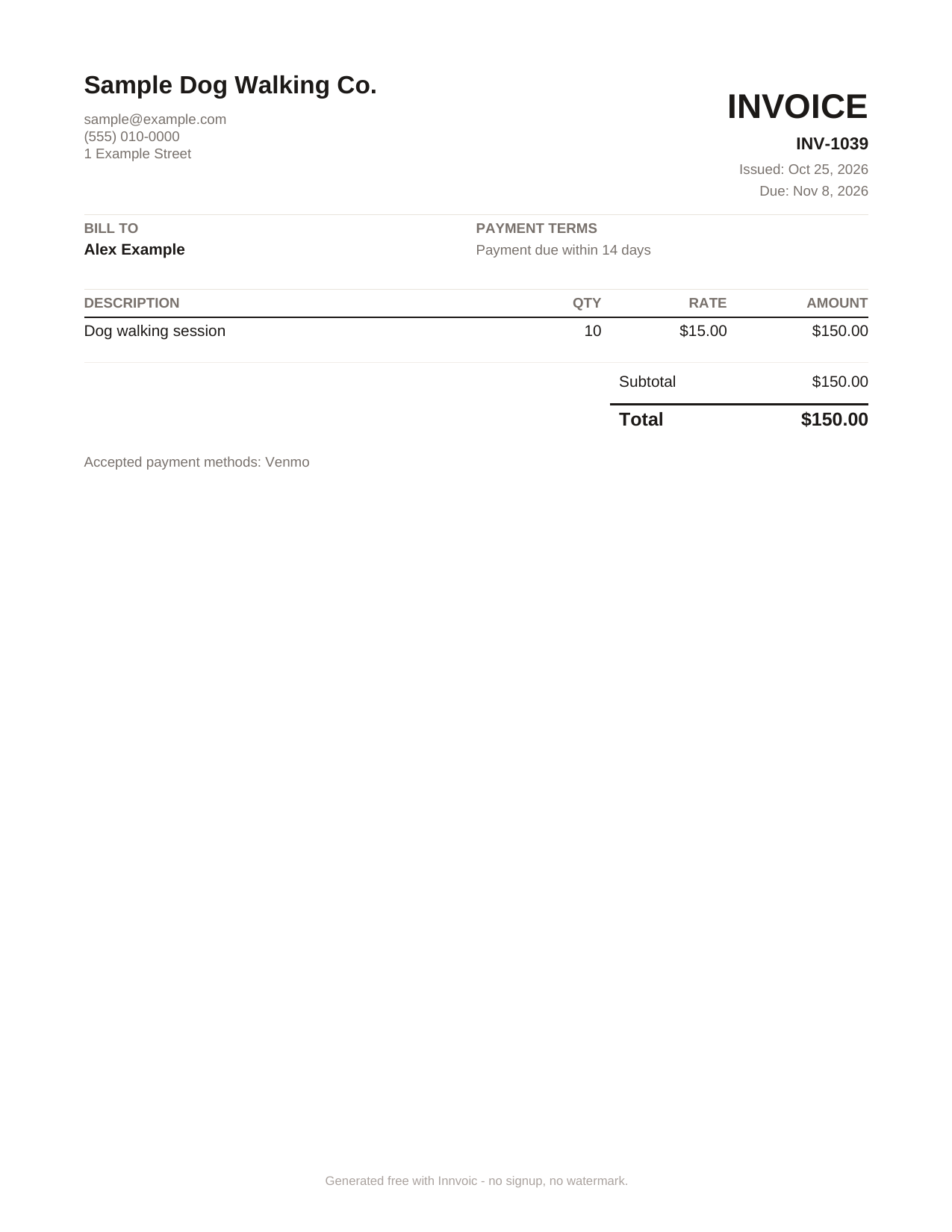
Sample invoice generated by the tool with fictional data: 10 dog walking sessions, 150 dollars total, Venmo listed as the accepted payment method. The scannable code appears in the tool’s preview, not in the PDF.
What Innvoic does and does not do
Everything on the invoice is assembled in your browser, and it stays there unless you pass the link on. Innvoic does not collect payments, does not send money, and does not charge you anything for the invoice. The money moves inside Venmo under Venmo’s terms, so a Venmo fee, if one applies, is a matter between you and Venmo.
Frequently asked questions
Do I need a Venmo business account to use this?
You need a Venmo account that can receive payments. Venmo offers business profiles, and its rules for receiving business payments can change, so check Venmo’s current terms before you bill clients through it.
Does Innvoic collect my Venmo payment?
No. Innvoic only creates the invoice document. The client pays you directly in Venmo.
Do I need to sign up to make an invoice?
No. The generator is free with no signup and no watermark.
Can I print the invoice and still use the code?
The downloaded PDF lists your payment method as text and does not include the scannable code. Scan the code from the tool’s on-screen preview instead.
What if my client does not use Venmo?
Add bank details as plain text to the same invoice, or make a separate invoice for a different payment method.
Is there a fee for the invoice?
No. Making and downloading the invoice is free. Any fee Venmo itself applies to a payment is separate.
Does Venmo itself make invoices?
Venmo’s business profiles are for accepting payments: customers find you by QR code or search, or pay contactless with Tap to Pay. Venmo’s own Business Profiles FAQ lists no invoice feature, so the invoice itself comes from a tool like Innvoic and payment happens in Venmo. Source: Venmo Business Profiles FAQ.