
Fill in the form and download a clean PDF invoice. Free, with no signup and no watermark — your data never leaves your browser.
How to create an invoice
Add your details
Enter your business name, your client’s details, and an invoice number. Clients save on your device for next time.
Add line items, tax & currency
List what you’re billing with quantity and rate. Pick a currency, add tax or discount — totals calculate automatically.
Download the PDF
Click Download PDF for a clean, print-ready invoice to send to your client. No account, no email gate, no watermark.
Excel Invoice Generator Alternative — Free Online
By Innvoic
Excel invoice templates work right up until they don’t. A formula breaks after a dragged cell. A total miscalculates and nobody notices until the client pays the wrong amount. Printing is fiddly, emailing means exporting by hand, and on a phone the whole thing is barely usable. This free online alternative does the math for you: per-line and invoice-level discounts and tax, automatic subtotals, shipping, rounding, and amount-paid tracking, all recalculating as you type. You get a live preview, one-click PDF download, and CSV export of your invoice history for your records or your accountant. Free, no login, and no
Prefer a spreadsheet?
Download the free Excel invoice template — it has working formulas, so totals, tax, and the balance update themselves. Subtotal, tax and total formulas tested in Excel.
Download the Excel template (.xlsx)
Use this template in the free tool — no signup
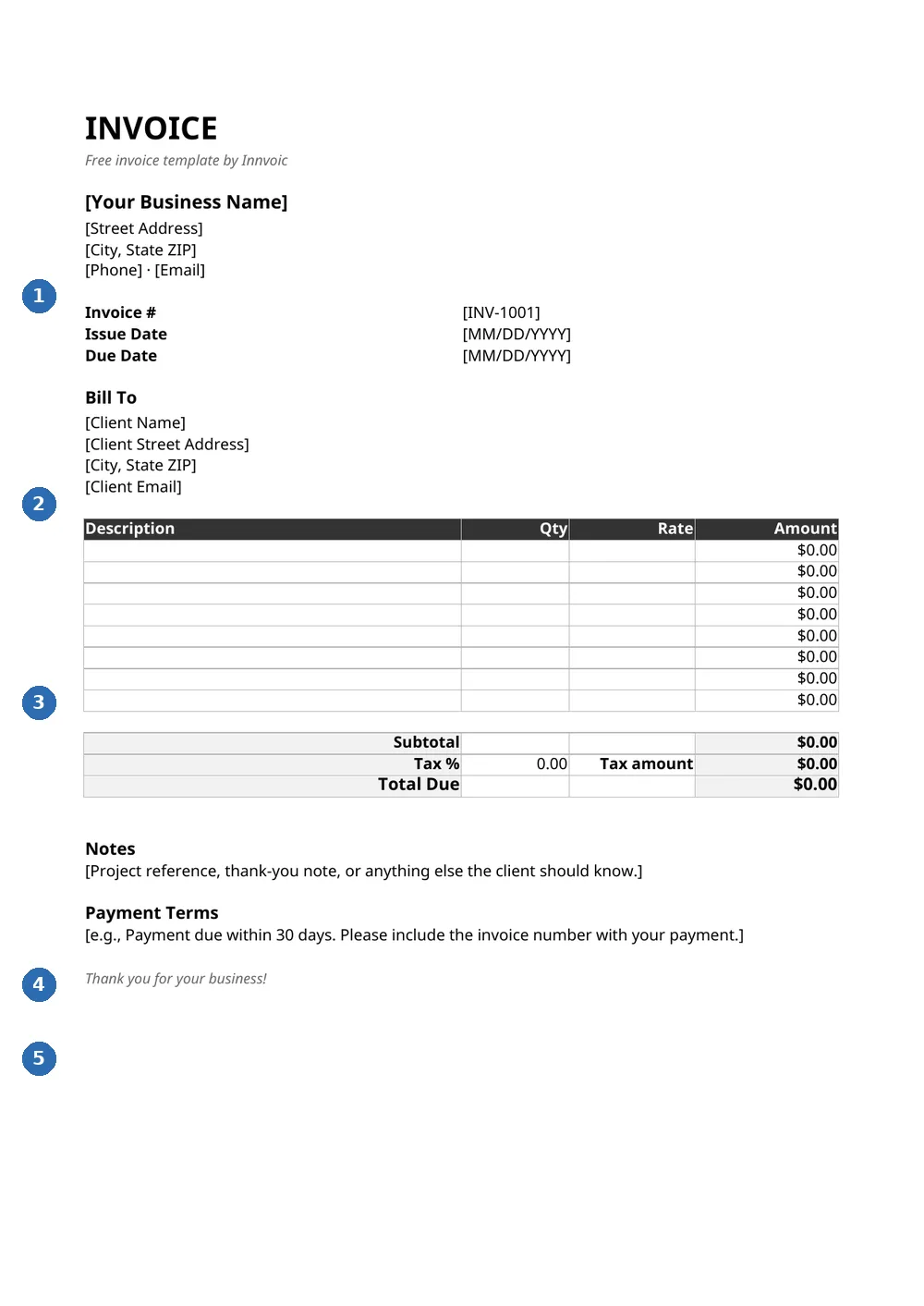
What you’re looking at: 1 — your business details; 2 — bill-to client block; 3 — line items (description, qty, rate); 4 — subtotal, tax, and total due; 5 — notes and payment terms.
Where spreadsheets go wrong with invoicing
An Excel invoice is a calculator wearing a document’s clothes. Every total depends on a formula someone typed once and never checked again. One overwritten cell and your client gets the wrong number. Tax handling is whatever you built yourself. And every “template” is a copy of a copy, drifting further out of sync each time somebody tweaks it. A dedicated generator replaces all of that with a form. You enter quantities and rates; totals, taxes, discounts, and balance due compute the same way every time. The layout is fixed and print-ready, so the client sees exactly what you saw. No print-area setup. No scaling surprises.
Keep your data portable with CSV export
The honest objection to leaving Excel is your data. It lives in your spreadsheet, and you should be able to keep it that way. So the tool has a CSV export: download your full invoice history (number, client, dates, totals, currency, status) any time and open it in Excel or Google Sheets for bookkeeping, tax prep, or backup. You get both sides: a purpose-built generator for making invoices, and an open format for everything else. No lock-in, no export fees, no “contact sales to get your data out.” Your work also autosaves in the browser as you type, so a closed tab costs you nothing.
Can this replace my Excel invoice template?
Yes. Line items, tax, discounts, totals: all automatic. Plus a live preview, PDF download, and invoice history. No formulas to maintain, none to break.
How do I export my invoices to Excel?
Hit the Export CSV button in My Invoices. The file opens directly in Excel or Google Sheets with number, client, dates, totals, currency, and status columns.
Is there an automatic invoice generator with Excel export?
Yes. Totals, taxes, and discounts calculate as you type, and your history exports to CSV any time. Free, no signup.
Do I need Excel installed to use this?
No. It runs entirely in your web browser on any device. Nothing to install, and your data stays on your device.
Related: Word invoice template, Google Docs invoice template, Google Sheets invoice template, all free invoice templates, PDF invoice generator.
How to use the Excel template with the online tool
Download the .xlsx file above and open it in Microsoft Excel. The template includes formulas for subtotal, tax, and total — these have been tested in Excel and calculate automatically when you enter line items. Adjust the tax rate cell to match your jurisdiction.
For new invoices, the free online invoice generator at the top of this page offers more features: client database, invoice history, PDF export, QR payment codes in the preview, and 35 currencies. The Excel template is best when you need a spreadsheet file for accounting or want to customize formulas.