
Fill in the form and download a clean PDF invoice. Free, with no signup and no watermark — your data never leaves your browser.
How to create an invoice
Add your details
Enter your business name, your client’s details, and an invoice number. Clients save on your device for next time.
Add line items, tax & currency
List what you’re billing with quantity and rate. Pick a currency, add tax or discount — totals calculate automatically.
Download the PDF
Click Download PDF for a clean, print-ready invoice to send to your client. No account, no email gate, no watermark.
Plumber Invoice Generator — Free, No Signup
By Innvoic
A plumbing invoice is three things stapled together: the call-out fee for showing up, the labor billed by the hour, and the parts fitted on the job. Leave any of them vague and you get the phone call: “what’s this $180 for?” Itemize them and you get paid without a word. This generator is built for the trade: call-out, labor, and parts as separate line items, tax handled per line, the whole thing raised from your phone before you leave the driveway. No signup, no fees, and the PDF comes out clean.
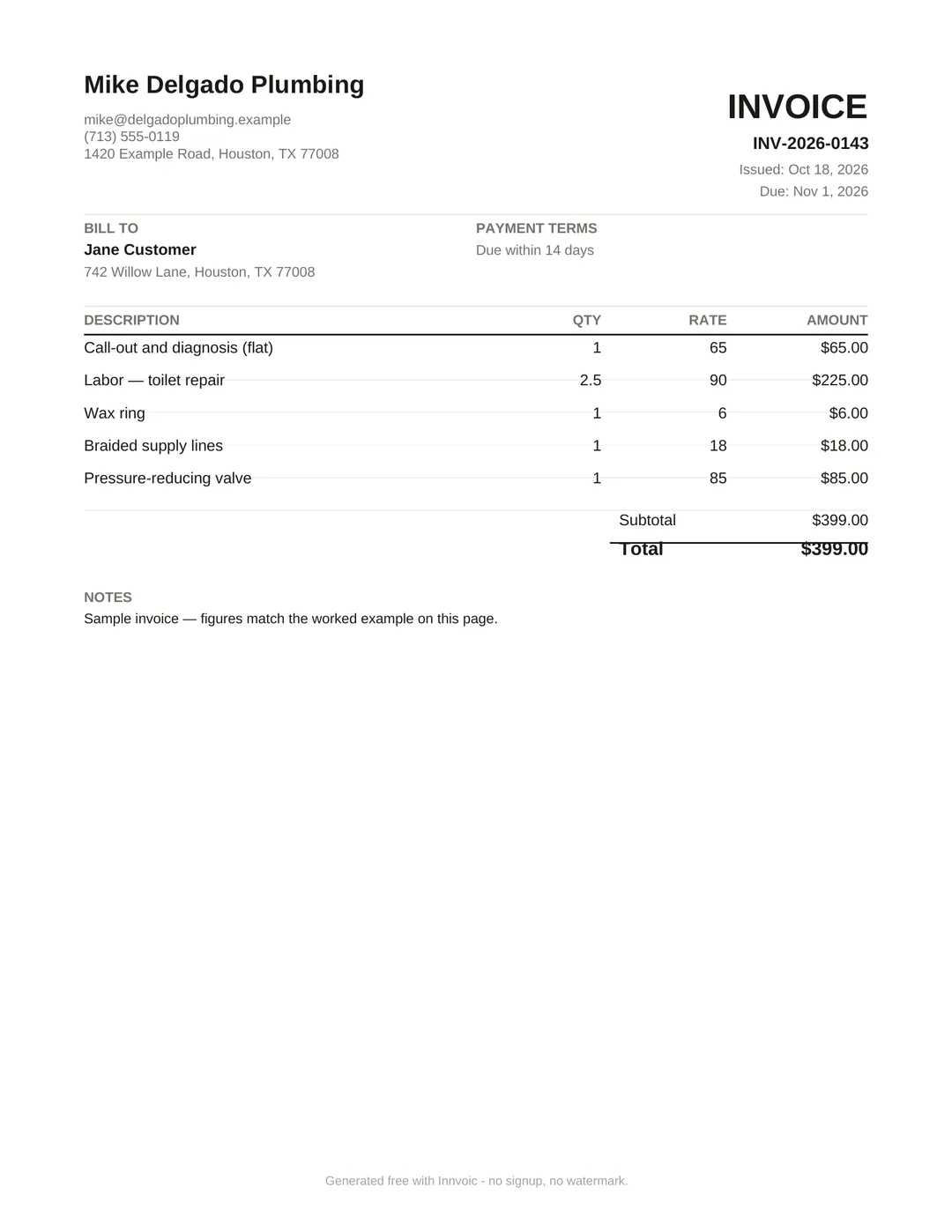
See what the finished PDF looks like: Download a sample plumber invoice (PDF). Sample invoice generated with the Innvoic tool using fictional details. Downloaded PDFs carry a one-line footer credit beginning “Generated free with Innvoic” — no watermark across the document.
Call-out, labor, parts: itemized properly
Run every job the same way and customers learn to read your invoices at a glance. First line: the call-out or diagnostic fee, flat, stated up front. Then labor. Switch the unit mode to Hours, enter your rate and the time on site, and the total computes itself: “Labor: 2.5 hours x $90” needs no explanation. Then parts and materials, one line each with quantities: wax ring, supply lines, PRV valve. Showing parts separately does two things. It justifies the total, and it creates the paper trail for warranty callbacks when a fitted part fails six months later. An invoice-level discount covers the goodwill gesture (“10% off for a repeat customer”) without hiding what the work was worth.
One job, start to finish: call-out and diagnosis $65 flat. Labor 2.5 hours × $90 = $225. Parts — wax ring $6, braided supply lines $18, pressure-reducing valve $85 — $109, each taxed per line where your state taxes materials. Total before tax: $399, and every dollar on the invoice has a label. That is the invoice that gets paid the same day.
Tax on parts vs labor, handled per line
Here is the part generic invoice apps get wrong for trades: parts and labor are not always taxed the same way. Depending on your jurisdiction, materials may carry VAT or sales tax at the full rate while labor is treated differently, and some jobs mix taxable parts with zero-rated or exempt labor. So every line item gets its own tax percentage, plus an invoice-level tax field on top. The call-out, the hours, and each part can each carry exactly the rate they should. The preview breaks line-item tax and invoice tax out as separate labeled totals, which is what your bookkeeper wants at quarter end. You set the rates that apply where you work; the math is automatic. This isn’t tax advice.
Invoice on the job, from your phone
The invoice should exist before the van door closes. The generator runs in the browser with a mobile layout and a sticky action bar. No app to install, no account to log into with greasy hands. Enter the parts as you fit them, add the hours, and email the invoice from the customer’s driveway or download the PDF on the spot. Same-day invoices get paid faster than “I’ll send it tonight” ones. The job is fresh, the customer is grateful, and the card is already in their hand. Add a QR payment code to the on-screen preview (UPI, PayPal.Me, Venmo, or bank transfer details) and plenty of customers pay before you’ve packed the toolbox. The downloaded PDF lists the payment method as text. Every invoice saves to My Invoices with its status, so Monday-morning admin is just checking which ones flipped to paid.
Two mistakes that cost plumbers time
Writing “repairs: $400” as one line. One lump sum invites one lump argument. Itemized, the customer argues with a $6 wax ring at worst — and usually doesn’t argue at all.
Raising the invoice at the end of the week. By Friday, neither of you remembers Tuesday’s job the same way. Send it from the driveway while the work is still visible in the customer’s mind.
What should a plumber put on an invoice?
Call-out or diagnostic fee, labor with hours x rate, and each part or material as its own line with a quantity. Add item numbers, brief descriptions, tax per line, payment terms, and your business details.
Should I charge a call-out fee separately?
Yes. List it as its own line item instead of burying it in labor. A stated call-out fee sets expectations before you arrive and kills the “you were only here 20 minutes” argument.
How do I handle tax on parts vs labor?
Give each line its own tax percentage so parts and labor can carry different rates where your jurisdiction requires it. The generator calculates per-line and invoice-level tax separately and shows both as labeled totals.
Can I invoice a customer from my phone on site?
Yes. It works in any mobile browser, no install or signup, with a sticky bottom action bar for small screens. Email the invoice or download the PDF before you leave the job.
Related: HVAC invoice generator, electrician invoice generator.
What a plumber invoice should include
A plumber invoice needs more than just the total. Include your business name and contact info at the top. A license number is commonly required depending on your location — check local rules. For the client, list their name and the service address — which is often different from the billing address. Describe each job clearly: “Kitchen sink drain cleaning” beats “Plumbing work.” List parts separately from labor so the client sees what they’re paying for. Always include the date of service, your payment terms (Net 15 or Net 30 are standard), and accepted payment methods.
Worked example: $399.00 drain repair
Here’s an illustrative plumber invoice example (not a market price), with the math checked:
- Service call fee: $99.00
- Labor — drain repair, 3 hours at $85/hour: $255.00
- Parts — replacement P-trap and fittings: $45.00
- Subtotal: $399.00 ($99.00 + $255.00 + $45.00)
- Tax: $0.00 (labor-only service, no taxable parts in this jurisdiction — check your local rules)
- Total due: $399.00
The sample invoice image above shows this exact $399.00 invoice created with the free tool. Enter the three line items, and the tool calculates the $399.00 total automatically.
Need invoices for similar trades? Try the HVAC invoice generator for heating and cooling work, the electrician invoice generator for electrical jobs, or browse all 16 trade invoice generators.