
Fill in the form and download a clean PDF invoice. Free, with no signup and no watermark — your data never leaves your browser.
How to create an invoice
Add your details
Enter your business name, your client’s details, and an invoice number. Clients save on your device for next time.
Add line items, tax & currency
List what you’re billing with quantity and rate. Pick a currency, add tax or discount — totals calculate automatically.
Download the PDF
Click Download PDF for a clean, print-ready invoice to send to your client. No account, no email gate, no watermark.
PayPal Invoice Template
By Innvoic | Last checked: October 2026
Send a PayPal client an invoice they can settle from a browser, with no app to install and no account to create on your side.
Who this is for
PayPal suits remote work where the client sits at a desk: design files, writing, consulting calls, virtual assistance, online lessons. The client opens a link, sees the total, and approves from a browser, which suits clients who would rather not install another app to pay one invoice.
How it works in 3 steps
- Fill in your business details, your client details, and the line items. Add the name from your PayPal.Me link to the payment details.
- Review the preview. Its code loads your PayPal.Me page with the total ready to approve, so the client logs in and confirms rather than entering the amount. The downloaded PDF carries PayPal as a text line, not as a code.
- Deliver the invoice and keep a copy. The client approves in PayPal, and the invoice remains the record of the sale.
How payment codes differ
For PayPal, the preview code loads your PayPal.Me page with the total ready to approve in a browser. The side-by-side method comparison shows where Venmo, Cash App, and Zelle differ.
What to include on a PayPal invoice
- The name from your PayPal.Me link, leaving off the paypal.me part, spelled as PayPal spells it
- Invoice number, invoice date, and payment timing: a due date, or Net 15 or Net 30 terms
- Your business name and your client name
- One row per item or service, with quantity and rate
- Subtotal, tax if any, and total due
- A short note that the preview code loads your PayPal.Me page with the total ready to approve
- Optional extras, like a late fee policy or a thank you message
Setting up PayPal.Me to receive invoice payments
Start with the PayPal.Me name itself. It is the last part of your payment link, so it belongs on the invoice exactly as PayPal shows it. Pick a name clients can read and trust at a glance, and check it in a browser before the first invoice goes out: open the link, confirm the page shows your business name, and confirm the total field behaves as expected. A link that opens to the wrong name will cost you the payment and the client.
The client moment happens in a browser. They scan the preview code, land on your PayPal.Me page, and see the total already entered. They log in and confirm, without typing the amount and without needing an app installed first. That browser step is the practical difference from app-first methods: a client on a desktop can pay from the same link without switching devices.
Keep the invoice number visible everywhere the payment can be discussed: on the invoice, in the message that carries it, and in your own records. PayPal activity shows amounts and dates, and two similar payments from one client in one month blur together without a reference. When a payment arrives, match its amount and date to an open invoice number first, and only then mark that invoice paid.
Sample invoice
A design studio bills a client for one homepage design at 600 dollars. The invoice shows: one design, 600 dollars subtotal, no tax, 600 dollars total due, due within 14 days, payable to the studio’s PayPal.Me name. The client scans the code in the tool’s preview, which opens the PayPal.Me link with 600 dollars already filled in, and both sides have a record. The downloaded PDF shows the same invoice with PayPal listed as the accepted payment method.
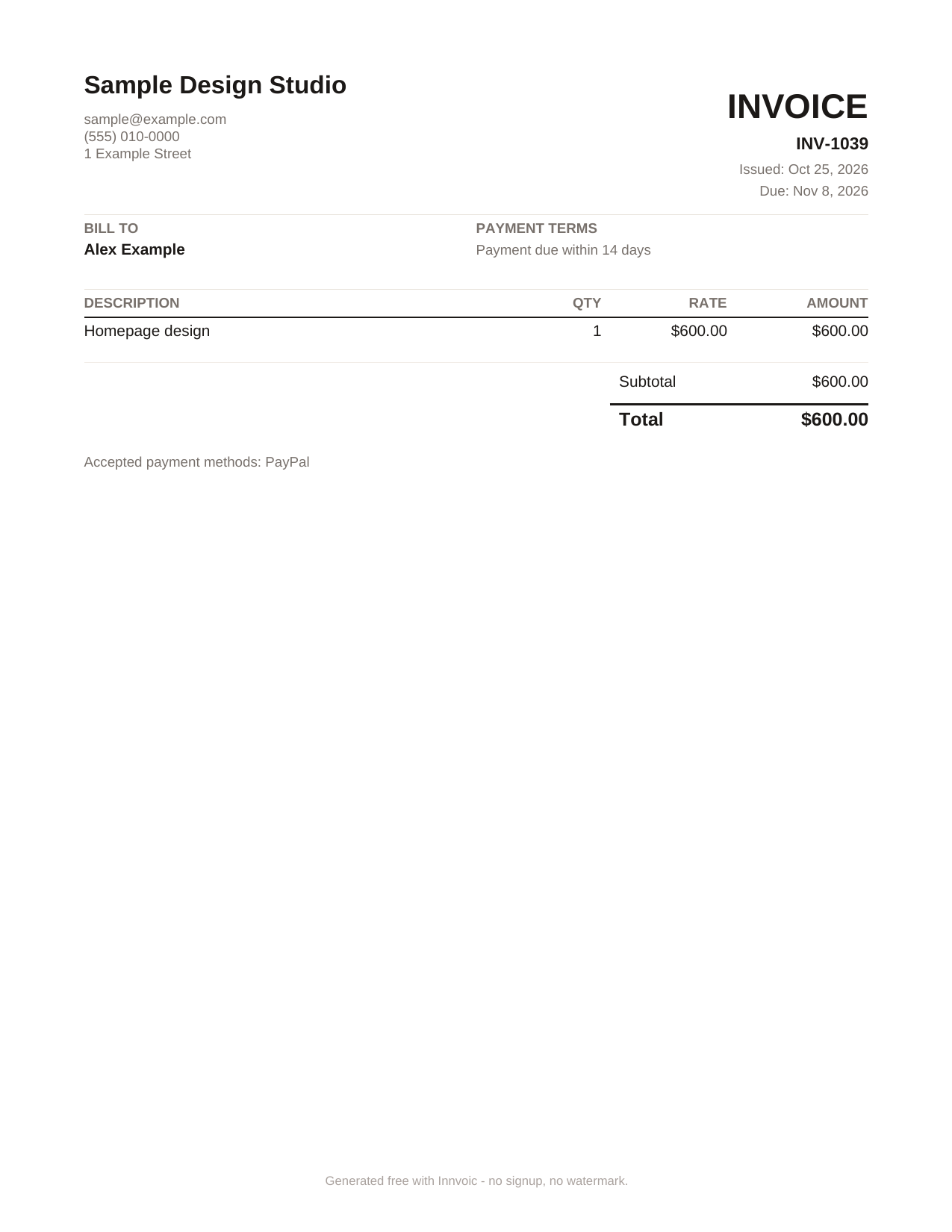
Sample invoice generated by the tool with fictional data: 1 homepage design, 600 dollars total, PayPal listed as the accepted payment method. The scannable code appears in the tool’s preview, not in the PDF.
What Innvoic does and does not do
The invoice never leaves your browser except when you share its link, and Innvoic takes no cut of anything. Innvoic does not collect payments, does not send money, and does not charge you anything for the invoice. PayPal handles the money on its own terms, fees included.
Frequently asked questions
Do I need a PayPal business account to use this?
You need a PayPal account that can receive payments. PayPal’s rules for receiving business payments can change, so check PayPal’s current terms before you bill clients through it.
Does Innvoic collect my PayPal payment?
No. Innvoic only creates the invoice document. The client pays you directly in PayPal.
Do I need to sign up to make an invoice?
No. The generator is free with no signup and no watermark.
Can I print the invoice and still use the code?
The downloaded PDF lists your payment method as text and does not include the scannable code. Scan the code from the tool’s on-screen preview instead.
What if my client does not use PayPal?
Add bank details as plain text to the same invoice, or make a separate invoice for a different payment method.
Is there a fee for the invoice?
No. Making and downloading the invoice is free. Any fee PayPal itself applies to a payment is separate.