
Fill in the form and download a clean PDF invoice. Free, with no signup and no watermark — your data never leaves your browser.
How to create an invoice
Add your details
Enter your business name, your client’s details, and an invoice number. Clients save on your device for next time.
Add line items, tax & currency
List what you’re billing with quantity and rate. Pick a currency, add tax or discount — totals calculate automatically.
Download the PDF
Click Download PDF for a clean, print-ready invoice to send to your client. No account, no email gate, no watermark.
Invoice with Shipping
By Innvoic
A shipping charge line adds the cost of delivering goods to your customer to the invoice total. You type the delivery amount into the shipping field, and it flows into the total automatically, so the buyer sees one final amount to pay.
Innvoic is a free invoice generator that runs in your browser with no signup. Your invoice data stays in your browser unless you choose to share a link or send it yourself.
Can I add a shipping cost to an invoice?
Yes. Innvoic has a shipping field on the invoice form: type the delivery amount there, and it is added to the invoice total. The field takes any amount you enter, so you set the charge yourself; the tool does not look up a carrier rate or calculate a delivery fee for you.
What is an invoice shipping fee?
An invoice shipping fee is the amount a seller charges the buyer for delivering the goods, shown as its own line on the invoice. In Innvoic, that line is the shipping field: type the amount there, and it flows into the total and shows on the downloaded PDF.
What is an invoice shipping cost?
An invoice shipping cost is the delivery amount added to an invoice, covering the cost of getting the goods to the buyer. You type the amount into the shipping field, and it flows into the total with the line items, tax, and any tips, so the buyer sees one final amount to pay.
How do I make an invoice for shipping?
Build the invoice as usual, then add the delivery details before you download it. Fill in your business and client details, add the line items, type the delivery amount into the shipping field, and turn on the ship-to block if the goods go to a different address. Then check the preview and download the PDF.
Steps:
- Build the invoice: business details, client, line items, and totals.
- Type the delivery amount into the shipping field.
- Turn on the ship-to block and enter the name and address if the delivery address differs from the billing address.
- Check the preview, then download the PDF.
Can you provide an example of a shipping invoice?
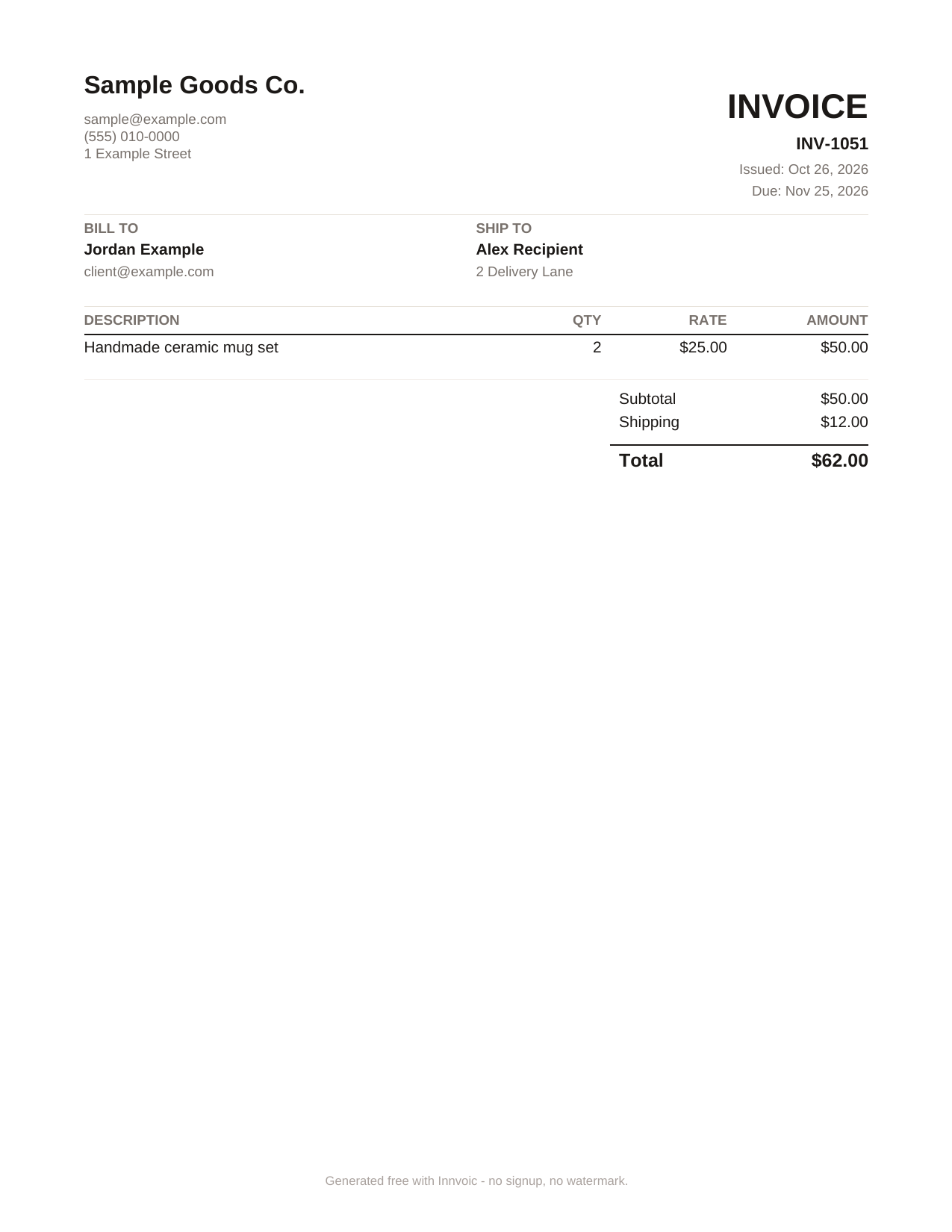
Yes. The example below is fictional, and it shows a shipping charge line plus a ship-to block on a finished invoice. Sample Goods Co. bills Jordan Example for a handmade ceramic mug set, adds a $12 shipping charge, and ships the order to a different address, for a total of $62.
Worked example with fictional numbers, labeled as an example. Sample Goods Co. bills Jordan Example. Item: Handmade ceramic mug set, quantity 2, rate $25, amount $50. Shipping: $12. Total: $50 + $12 = $62. Terms: Net 30. Invoice number INV-1051. Bill to: Jordan Example. Ship to: Alex Recipient, 2 Delivery Lane.
Does the shipping charge change the invoice total?
Yes. The shipping amount feeds the totals calculation, so the total rises by exactly the shipping amount you enter. The tool adds the subtotal after discounts, plus line tax and invoice tax, plus shipping, plus tips: in the example above, $50 plus $12 shipping gives a $62 total.
Scope note: is shipping taxable? Shipping may or may not be taxable depending on jurisdiction; check local rules. In the tool, the shipping field adds the amount to the total without tax. If your jurisdiction taxes shipping, enter the shipping amount as a taxable line item so the line tax applies; otherwise leave it in the shipping field untaxed.
Can I add a separate ship-to address?
Yes. Innvoic has an optional ship-to block: turn it on, and enter the name and address where the goods go. The ship-to address is separate from the billing address, so the buyer on the invoice and the delivery recipient can differ, as in the example where Alex Recipient receives the order.
What Innvoic does and does not do about shipping
What Innvoic does:
- Shipping field that feeds the invoice total
- Optional ship-to block with name and address
- Free invoice generator in the browser with no signup
- Direct PDF download
- Per-line tax and discount controls
- Client database and invoice history stored in the browser
What Innvoic does not do:
- Calculate carrier rates or delivery fees (you type the shipping amount)
- No freight shipping documents or customs paperwork: this page covers a charge line on a regular sales invoice, not a carrier’s shipping document.
- Email sending or payment collection
- A PAID stamp on the PDF
Sample invoice
Sample invoice, fictional data only. Business: Sample Goods Co., sample@example.com, (555) 010-0000, 1 Example Street. Client: Jordan Example, client@example.com. Ship to: Alex Recipient, 2 Delivery Lane. Issued October 26, 2026. Due November 25, 2026 (Net 30). Item: Handmade ceramic mug set, quantity 2, rate $25, amount $50. Shipping: $12. Total: $62.
Frequently asked questions
What does ‘invoice shipping’ mean?
‘Invoice shipping’ means the shipping charge on an invoice: the delivery amount a seller adds when goods go to the buyer. It is a line on a regular sales invoice, not a carrier’s shipping document, and in Innvoic it is the amount you type into the shipping field.
What is an invoice shipping address?
An invoice shipping address is the address where the goods go. It can match the billing address, or it can differ when the buyer asks you to deliver elsewhere. In Innvoic, you enter it in the optional ship-to block, and it shows on the invoice apart from the billing address.
What is an invoice ship to address?
An invoice ship to address is the delivery address entered in the tool’s optional ship-to block. Turn the block on, enter the recipient’s name and address, and it shows on the invoice apart from the billing address. Use it when the delivery recipient differs from the buyer on the invoice.
Can I also add a PO number, tip, or terms here?
Yes. The invoice form also has an optional PO number field, a tips field, and a Notes / Terms field, and this page mentions them only in passing because it covers shipping. The PO number prints as ‘PO: value’ on the preview and PDF when set, and terms print under ‘TERMS AND CONDITIONS’.